Universal data logger and process control
Log data and control electronic instruments
Lily Data Logger Studio is a powerful and flexible solution for universal data logging and process control. Easily connect, monitor, and control virtually any electronic instrument, all from one intuitive platform.
Log data from a wide range of instruments, including multimeters, oscilloscopes, temperature meters, IoT devices, power analyzers and more. The software provides reliable, real-time data acquisition and allows you to store and visualize measurements effortlessly. Visualize your data in real time with clear graphs.
Go beyond data logging. Control and automate your equipment, such as power supplies, temperature chambers and other programmable devices. Set up automated workflows to fully integrate your instruments into your processes.
Whether you're working in R&D, production, testing or education, Lily Data Logger Studio adapts to your needs.
Lily Data Logger Studio is completely free to use, with no hidden costs or limitations. There are no restrictions on features, devices, or data volume.
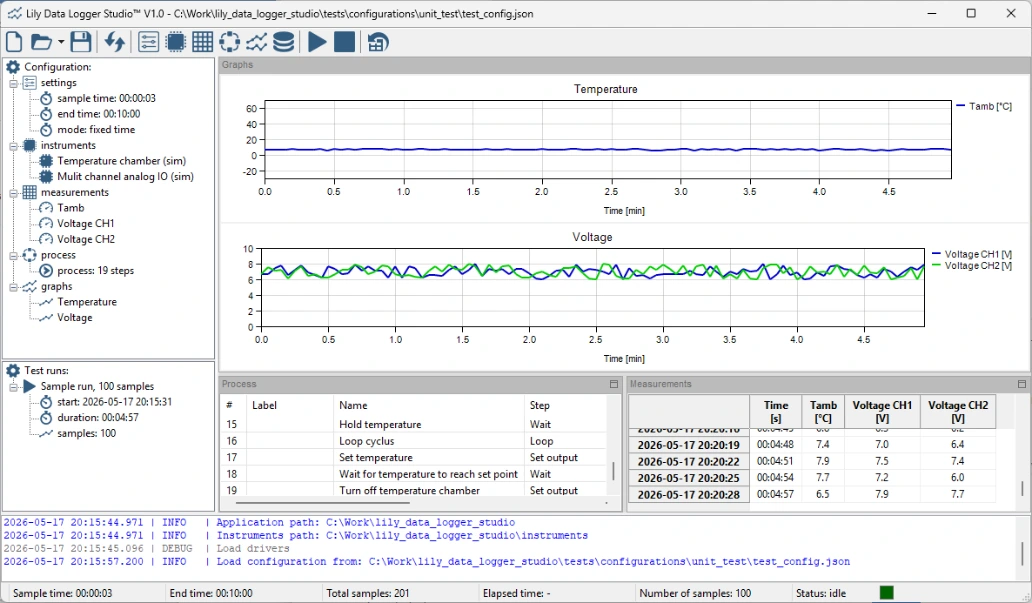
Core Features
Data logger
Log measurements from any electronic instrument.
Process control
Control any electronic instrument.
Graphs
Visualize data in graphs with real-time updates.
Export
Export your data to various formats including SQLite, JSON and CSV.
Download Lily Data Logger Studio now and get started today.
Download Lily Data Logger Studio
Downloads are available for Windows and Ubuntu. Please download the correct version for your system.
Lily Data Logger Studio is a portable application and does not require any installation.
Manuals are included.
Lily Data Logger Studio is open source and hosted on GitHub.
In case of any issues, please report them using the issue tracker on GitHub.
Lily Data Logger Studio communicates with electronic instruments using drivers. We are not able to provide drivers for all instruments available on the market. To address this, Lily Data Logger Studio includes an instruments package that already contains a number of instrument drivers.
Drivers can be added to the instruments package without the need to reinstall the application. Drivers are developed using Python. A manual for developing drivers is included, making it possible to connect to virtually any instrument using any type of protocol.
If you are unable to develop drivers yourself, you can request that we develop one for you. Please submit an issue using the issue tracker on GitHub. We will then discuss the details of the driver development.
If you have developed a driver yourself, we would appreciate it if you could share it with us so it can be included in the instrument package. You can submit drivers using the issue tracker on GitHub.